Back to School Sticker Pack 2: A Versatile Design Resource for Educators, Crafters, and Digital Creators
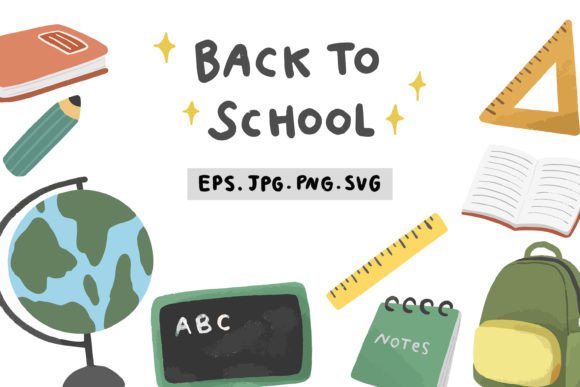
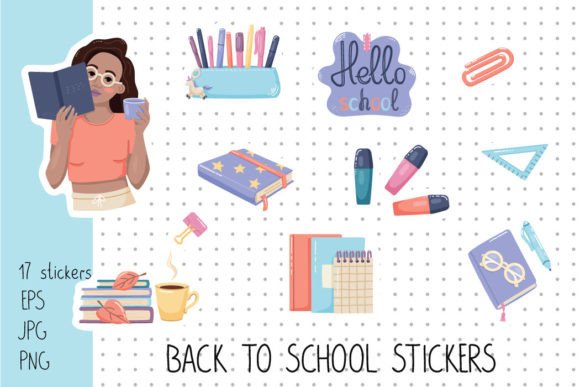
Back to School Sticker Pack 2 stands apart not just as seasonal clipart—but as a thoughtfully engineered design asset built for flexibility, precision, and real-world application. Unlike generic sticker bundles that prioritize quantity over utility, this collection delivers 17 hand-crafted, school-themed elements—each rendered with intentional variations in format, background treatment, stroke definition, and resolution—to serve distinct production needs across physical and digital workflows.
Why Format Diversity Matters More Than You Think
At first glance, the list of included files may appear redundant: multiple PNGs, JPGs, EPS files, all featuring the same 17 school items (think notebooks, pencils, apples, backpacks, graduation caps, and more). But each variation addresses a specific technical or functional requirement:
- White border only (PNG & EPS): Ideal for clean digital overlays on light-colored slides, lesson plans, or social media graphics where subtle framing enhances legibility without visual clutter.
- White border + gray stroke (PNG, JPG, EPS): Designed explicitly for hand-cutting—whether using craft knives, scissors, or entry-level die-cut machines. The gray stroke acts as a precise visual guide, ensuring clean edges even when cutting manually around intricate shapes like erasers with textured surfaces or spiral-bound notebooks.
- Dotted background variants (PNG & JPG): Solve a persistent layout challenge—creating consistent visual rhythm in printed materials like reward charts, classroom signage, or student planners. The evenly spaced dots provide implicit grid alignment without competing with sticker content.
- Transparent-background PNGs (2550 × 3300 px, 300 DPI): Meet professional print standards while retaining full layer control in design software. This resolution supports sharp output at up to A4 size—even when scaled down for small labels or badge inserts.
- JPG versions on white (300 DPI): Offer compatibility with platforms that don’t support transparency—such as certain LMS interfaces, basic email editors, or older presentation tools—without requiring manual background removal.
This granular attention to delivery formats reflects an understanding that users aren’t just downloading “stickers”—they’re solving concrete problems: a teacher preparing laminated behavior trackers, a small-business owner designing custom back-to-school mailers, a parent crafting personalized lunchbox notes, or a curriculum developer building interactive PDF worksheets.
Real-World Applications Across User Groups
The strength of Back to School Sticker Pack 2 lies in how its structure maps directly to diverse workflows—not theoretical use cases, but documented patterns observed among educators, makers, and designers.
Educators: From Lesson Materials to Classroom Culture
In classrooms, consistency and clarity reduce cognitive load. A third-grade teacher might use the dotted-background PNGs to build a reusable “Reading Goal Tracker,” placing stickers beside each completed book. Because the dot grid is baked into the file, alignment stays accurate across print batches—even when reprinted months later. Meanwhile, the gray-stroked JPG version allows quick insertion into Google Slides for morning announcements: no need to toggle layers or adjust stroke settings mid-presentation.
For behavior reinforcement systems, the white-border-and-gray-stroke variant becomes indispensable. When cut by students during fine-motor activities, the visible stroke ensures uniform margins—critical when assembling a “Kindness Wall” where mismatched edges would undermine visual cohesion. One special education resource teacher reported that switching from unframed clipart to this pack reduced sticker misalignment by over 70% during group cutting tasks.
Crafters and Small-Business Owners: Bridging Digital Design and Physical Output
Hobbyists using Cricut or Silhouette machines benefit from the EPS10 files with white borders—they import cleanly into design space software, retain vector fidelity at any scale, and allow stroke width adjustment without pixelation. For those still working with scissors and cardstock, the high-resolution JPGs with gray strokes eliminate guesswork: the line functions as both guide and buffer zone, accommodating slight blade deviations.
A boutique stationery seller used the transparent-background PNGs to create layered digital stickers for Notability and GoodNotes. Because each element is isolated at 300 DPI, zooming into handwritten annotations doesn’t reveal jagged edges—a detail that significantly improved customer reviews related to “crispness” and “professional appearance.”
Instructional Designers and EdTech Developers
When building accessible learning modules, contrast and separation matter. The white border ensures stickers remain distinguishable against varied slide backgrounds—including textured or gradient-filled templates common in modern LMS themes. And because all 17 elements share identical border weight and corner radius, visual hierarchy remains predictable—no single icon dominates due to inconsistent sizing or stroke thickness.
One university instructional designer integrated the dotted-background variants into a self-paced orientation course. Students drag-and-drop stickers onto weekly checklists; the subtle dot pattern provides spatial orientation without drawing attention away from actionable items—a balance rarely achieved with default UI icons.
Technical Considerations That Impact Long-Term Usability
While many sticker packs emphasize aesthetics alone, Back to School Sticker Pack 2 embeds practical engineering decisions that affect longevity and cross-platform reliability:
- EPS10 compatibility: Ensures backward compatibility with Adobe Illustrator CS6 and newer, while preserving editable paths—vital for institutions standardizing on older licensed software.
- Consistent 2550 × 3300 px dimensions: Matches standard US letter-size print layouts at 300 DPI, eliminating scaling errors when exporting to PDF for district-wide distribution.
- No embedded fonts or effects: All text-based elements (e.g., “A+”, “100%”) are converted to outlines—preventing missing-font warnings or rendering inconsistencies across devices.
- Neutral color palette: Uses accessible contrast ratios (tested against WCAG 2.1 AA) even within decorative elements—making the apple red, pencil yellow, and notebook blue usable in inclusive environments without additional adjustment.
These aren’t cosmetic upgrades. They’re responses to recurring pain points: lost transparency in exported PDFs, blurry icons on interactive whiteboards, mismatched sizes across grade-level materials, or inaccessible color combinations flagged during accessibility audits.
How It Fits Into Evolving Educational and Creative Workflows
Today’s creators rarely operate within a single medium. A middle school art teacher may start with transparent PNGs in Canva to draft a bulletin board layout, switch to EPS files in Illustrator to modify stroke weight for vinyl cutting, then export the gray-stroked JPG for student-facing Google Docs instructions. Back to School Sticker Pack 2 anticipates these transitions—not by offering “one file fits all,” but by providing the right file for each step.
This approach mirrors broader shifts in digital literacy expectations: educators are now routinely asked to produce polished multimedia resources, not just photocopies. Small studios compete on turnaround speed and polish—where having pre-aligned, print-ready assets cuts prep time by hours per project. Even researchers documenting classroom interventions rely on consistent visual markers across observation logs, presentations, and publications; standardized sticker treatments support replicability.
What to Keep in Mind Before Use
Despite its versatility, effective implementation depends on context-aware selection—not automatic use of every file type. Consider these practical observations:
- Transparency isn’t always optimal: In low-bandwidth LMS environments, large transparent PNGs can slow page loading. For web-based dashboards, the white-background JPG may deliver faster rendering with negligible visual trade-off.
- Gray stroke ≠ universal cut line: While ideal for paper and thin cardstock, thicker materials like chipboard may require adjusting stroke width in vector editors before sending to industrial cutters.
- Dotted backgrounds add visual weight: In dense layouts (e.g., multi-column handouts), they can compete with text. Reserve them for standalone visuals or low-text zones like header banners or certificate borders.
- Resolution is purpose-built: The 2550 × 3300 px size excels for print but exceeds typical screen-display needs. For digital-only use, resizing to 1200 × 1555 px maintains clarity while reducing file weight by ~75%.
Understanding these nuances transforms Back to School Sticker Pack 2 from a decorative download into a strategic toolkit—one where each file serves a documented role rather than occupying storage space.
Looking Beyond the Season
Though titled for back-to-school timing, the design language avoids trend-dependent motifs (no viral memes, dated slang, or fleeting aesthetics). Instead, it leans into timeless school symbolism—clean lines, balanced proportions, and universally recognized objects. That timelessness extends usability: the same pencil icon works equally well in a September welcome slide, a March study-skills handout, or a June graduation celebration graphic.
More importantly, the structural logic—format variety, resolution integrity, accessibility-first color choices—sets a benchmark for how educational assets should be delivered. It signals a shift from treating clipart as disposable decoration to recognizing it as infrastructure: foundational, interoperable, and built to last beyond a single academic year.