Back to School Icon Pack: Practical Icons for Educators, Designers, and Marketers
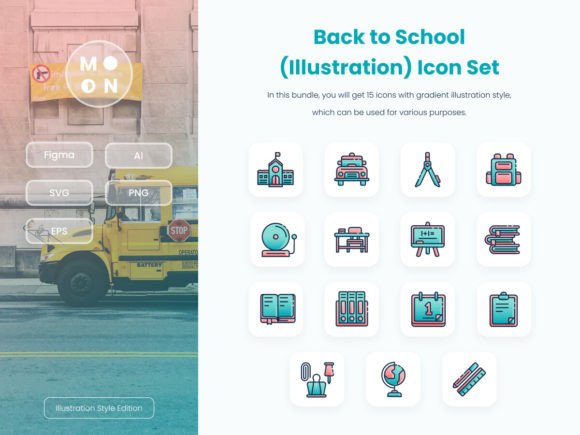
If you’re launching a back-to-school campaign, updating a learning app, or designing classroom materials — you know how much time gets lost hunting for icons that *actually fit*. Not just “school-themed,” but clean, consistent, and ready to drop into real projects. That’s where the Back to School Icon Pack steps in: a focused set of 15 education-inspired icons designed with purpose — not just aesthetics.
What You’re Really Getting (Beyond the Files)
This isn’t a sprawling library of 200 generic symbols. It’s a tight, intentional collection — think notebook, graduation cap, backpack, chalkboard, calculator, student desk, online class, library book, and more — all drawn in a cohesive illustration style. Each icon is crafted with clarity in mind: legible at small sizes, expressive at large ones, and balanced in weight and spacing.
The value isn’t just in the visuals — it’s in how effortlessly they integrate. Every icon comes in SVG, PNG (with transparency), EPS, Adobe Illustrator (.ai), and Figma files. That means whether you’re tweaking colors in Figma for a new app screen, scaling an SVG for a responsive website header, or dropping a high-res PNG into a printed flyer — no rework, no pixelation, no guesswork.
Where These Icons Solve Real Problems
Let’s talk about where the Back to School Icon Pack shows up *in action* — not in mockups, but in actual workflows:
- Educators & EdTech Teams: Building a parent portal? Use the calendar and homework icons to label assignment deadlines clearly. Designing a digital lesson plan template? The chalkboard and student profile icons add visual cues without clutter. No need to hire a designer for internal tools — just customize color and size to match your school’s brand.
- Marketing Agencies & Small Business Owners: Running a back-to-school sale for tutoring services or after-school programs? Swap the backpack icon into social media carousels, use the graduation cap in email headers, or layer the bookstack onto Instagram Stories. Because all icons are vector-based and fully editable, you can match exact brand hex codes — no awkward color shifts or mismatched palettes.
- Nonprofits & Community Organizations: Creating bilingual flyers for literacy workshops or STEM camps? The microscope, computer, and group discussion icons communicate concepts faster than translated text alone — especially helpful for multigenerational or low-literacy audiences.
- Freelance Designers & Presenters: Pitching a new curriculum redesign to school boards? Drop the classroom and learning path icons into slides — they read as professional, warm, and human-centered (not clip-art stiff). And because each icon is built on a perfect pixel grid and optimized for screen display, they look sharp on projectors and tablets alike.
Why Format Flexibility Matters More Than You Think
You’ll get 15 PNGs with transparent backgrounds — great for quick drag-and-drop into Canva, PowerPoint, or Mailchimp. But the real power lies in the vector formats. Need to animate the student cap icon for a welcome video? Open the SVG in After Effects or Lottie. Want to adjust stroke weight for accessibility (thicker lines = better readability for low-vision users)? Edit directly in Illustrator. Working in Figma with a team? Everyone can tweak colors, resize, or even recolor individual layers — no handoff delays.
And yes — every icon scales infinitely. Whether you’re printing a 4’x8’ banner for a school fair or fitting the pencil icon into a 24px mobile navigation bar, it stays crisp. No blurry exports. No last-minute “Can we just make it bigger?” panic.
What to Keep in Mind Before You Use It
First — this is a design resource, not a full UI kit. There’s no dashboard layout, no pre-built buttons or cards. It gives you the building blocks, not the blueprint. If you’re expecting ready-made templates for a learning management system, this isn’t it — but if you’re assembling those pieces yourself, it saves hours.
Second — while the icons cover core education concepts, they don’t include niche subjects like coding syntax, musical notation, or lab-specific equipment. It’s intentionally broad enough for K–12 and early college contexts, but not exhaustive for specialized curricula.
Third — the pack includes only the icons. Any photos, device mockups, or background scenes you see in previews are for visual context only. They’re not part of the download. What you get is clean, isolated assets — which is exactly what most professionals prefer (no cropping, no permissions headaches).
Who Benefits Most — and How
A graphic designer working on a university’s orientation campaign might use the campus map and orientation schedule icons to unify digital and print touchpoints — ensuring consistency from the website to the welcome booklet.
A homeschooling parent creating printable checklists could open the Illustrator file, change the checkmark icon to green, scale it to 16px, and embed it in a PDF — all in under two minutes.
A startup building a reading app for kids might import the storybook and reading lamp icons into Figma, then use auto-layout to generate consistent button states — hover, active, disabled — without redrawing anything.
Even someone managing a PTA Instagram account benefits: drag the parent-teacher conference icon into a Canva story, pair it with a friendly headline (“Let’s Talk About Your Child’s Progress!”), and post — no design degree required.
Small Details That Add Up
Each icon was built with real usage in mind. The online class icon includes subtle screen glow; the backpack has visible zipper detail — not so much that it breaks down at small sizes, but enough to feel intentional. Stroke widths are consistent across the set, so when you place the calculator next to the notebook, neither overpowers the other visually.
And because everything is layered and named logically in the source files (e.g., “Cap_Group”, “Textbook_Shadow”), editing isn’t a mystery — it’s predictable. Change one color swatch, and the whole set updates. Duplicate a layer, recolor it blue for “active” state, and you’ve got interactivity-ready assets.
Bottom line: the Back to School Icon Pack doesn’t try to do everything. It does one thing well — deliver education-themed icons that work *where you need them*, without friction, without compromise, and without wasting your time.