11 Back to School Vector Illustration: A Practical Guide for Designers and Educators
When preparing educational materials—whether for a school district’s welcome campaign, a tutoring service’s landing page, or a nonprofit’s back-to-school outreach—the right visual foundation matters. The 11 Back to School Vector Illustration collection stands out as a purpose-built resource for professionals who need flexibility, clarity, and thematic consistency without sacrificing creative control.
What Sets This Collection Apart
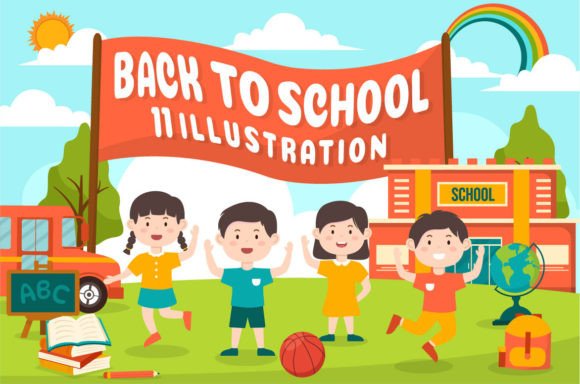
The 11 Back to School Vector Illustration is not a single image but a curated set of 11 distinct, cohesive vector scenes. Each illustration features schools, learning equipment (like notebooks, pencils, globes, and backpacks), and cheerful, flat cartoon characters rendered in a hand-drawn style. Unlike generic clipart or photorealistic stock assets, these illustrations prioritize readability at scale, adaptability across formats, and intentional design language suited to children’s education contexts.
Crucially, the collection emphasizes technical readiness: every file is fully editable in Adobe Illustrator (Ai), EPS 10, and SVG formats. That means you can adjust individual objects—reposition a chalkboard, resize a school bus, or recolor a student’s shirt—without raster artifacts or layer flattening. The inclusion of layered PSD files further supports hybrid workflows, especially when integrating with photographic elements or web UI components.
How It Compares to Other Educational Design Resources
Many designers begin their search with broader categories: general education vectors, school-themed stock photos, or free icon sets. While those options may suffice for simple overlays or low-stakes social posts, they often fall short where precision and scalability are required.
- Free vector packs frequently lack consistent style across illustrations—mixing line weights, perspective angles, or color palettes—making it difficult to build a unified brand look across multiple touchpoints.
- Photographic backgrounds offer realism but rarely support transparent compositing, and editing them meaningfully requires advanced Photoshop skills and time-intensive masking.
- Custom illustration commissions provide perfect fit and originality but involve lead time, budget commitments, and revision cycles that aren’t feasible for seasonal or time-sensitive projects.
In contrast, the 11 Back to School Vector Illustration strikes a practical middle ground: professional-grade quality with immediate usability. Its hand-drawn flat cartoon aesthetic avoids the dated feel of early-2000s clipart while remaining more approachable and age-appropriate than minimalist or abstract alternatives.
Strengths and Real-World Fit
The collection excels in scenarios where speed, consistency, and accessibility intersect. For example:
- A community center designing bilingual back-to-school brochures can use the same illustration across English and Spanish versions, adjusting only text and minor color accents—no need to re-source or redraw.
- An edtech startup launching a teacher onboarding portal might apply one illustration as a hero banner, another as an animated loading screen element (via SVG), and a third as a printable PDF checklist background—all from the same source files.
- A public library running a summer-to-fall transition program could print one illustration at poster size (thanks to vector scalability) and repurpose the same asset for email headers, social thumbnails, and classroom handouts.
The inclusion of PNGs with transparent backgrounds simplifies integration into digital tools like Canva or Figma, while the preview JPEGs and help file reduce onboarding friction for non-designers managing marketing assets.
Tradeoffs and Limitations to Consider
No resource fits every need—and understanding where the 11 Back to School Vector Illustration has boundaries helps avoid mismatched expectations.
First, the style is intentionally child-friendly and illustrative—not realistic, corporate, or data-driven. If your audience includes higher-education administrators or policy stakeholders, a more neutral or infographic-oriented visual approach may communicate authority and complexity more effectively.
Second, while the 11 scenes cover common motifs (classrooms, buses, backpacks, books), they don’t include niche subjects like STEM labs, special education tools, or culturally specific school architecture. Designers needing those details may need to supplement with custom edits or additional assets.
Third, although the files are layered and editable, they assume baseline familiarity with vector software. Someone new to Illustrator or InDesign may find the initial customization steeper than drag-and-drop templates—but significantly less steep than starting from scratch.
When It’s the Right Choice—and When It’s Not
The 11 Back to School Vector Illustration is most valuable when you need:
- Thematic cohesion across multiple deliverables—especially if you’re producing both print and digital materials on a tight timeline;
- Editable, scalable assets that maintain quality whether viewed on mobile or printed at 48" wide;
- A friendly, inclusive tone aligned with early childhood through elementary education contexts;
- Technical versatility, including compatibility with web development (SVG), print production (EPS), and collaborative design tools (PSD layers).
It’s less suitable if you require:
- Photorealistic imagery for documentary-style storytelling;
- Animated sequences or interactive elements beyond static SVG use;
- Highly specialized subject matter outside standard K–5 learning environments;
- A completely turnkey solution with zero editing—since customization, while easy, remains part of the workflow.
Practical Integration Tips
To maximize value from the collection, consider how you’ll use it before downloading or purchasing:
- Evaluate your output requirements first. If you primarily create web banners and email graphics, SVG and PNG transparency will be your most-used assets. If you’re printing posters or stationery, test EPS and Ai files in your prepress workflow.
- Check color system alignment. The illustrations use a defined palette, but since colors are editable, you can match institutional branding—or adapt them for accessibility (e.g., increasing contrast for low-vision readers).
- Review layer naming conventions. Well-organized PSD and Ai files save hours during revisions. The help file included with the 11 Back to School Vector Illustration outlines layer structure, which helps teams collaborate efficiently.
- Consider long-term reuse. Because these are vector-based, they won’t degrade over time or with format conversions—unlike raster images that blur or pixelate when scaled.
Making an Informed Decision
Choosing visual assets isn’t just about aesthetics—it’s about workflow efficiency, message accuracy, and audience resonance. The 11 Back to School Vector Illustration delivers strong utility for educators, marketers, and designers working within early-learning and community education spaces. Its balance of stylistic warmth, technical readiness, and modularity makes it a reliable option when consistency and adaptability matter more than novelty alone.
That said, always weigh it against your specific goals: the scope of your project, your team’s technical capacity, your audience’s expectations, and your timeline. Sometimes, a smaller, more focused set—or even a custom brief—is the better path. But when you need 11 thoughtfully composed, production-ready scenes that work across posters, banners, brochures, and digital interfaces, this collection offers grounded, practical value without overpromising.