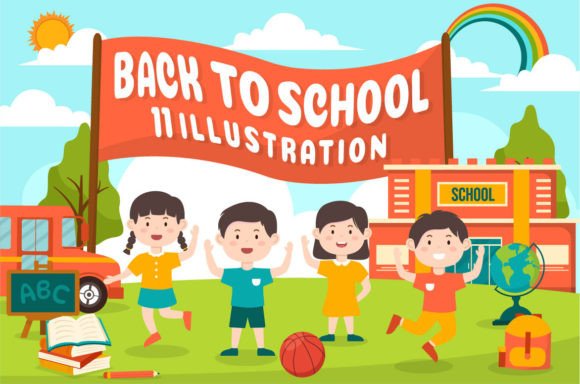
Back to School Vector Illustration 48
If you're designing for the academic season—whether launching a tutoring service, updating your school district’s website, or creating social content for an edtech startup—Back to School Vector Illustration 48 is more than just clipart. It’s a flexible, production-ready toolkit built for real-world design workflows.
This collection isn’t a single static image. It’s 100 thoughtfully crafted vector illustrations, all unified under a clean flat design aesthetic—no gradients, no heavy shadows, just crisp shapes and intentional spacing. Each illustration is delivered in both EPS (for full vector editing) and high-resolution JPG (5000 × 5000 pixels), so you can scale from mobile app icons to printed banners without pixelation or quality loss.
Why Designers Reach for This Set Again and Again
What makes Back to School Vector Illustration 48 stand out isn’t just quantity—it’s editability baked into every shape. Every element—books, backpacks, chalkboards, pencils, graduation caps, even abstract learning icons—is fully separated and layered. That means you’re not stuck with preset color schemes or fixed compositions. You can recolor a notebook’s cover in your brand’s teal, swap a yellow pencil for a lavender one, or delete a background element entirely—all within Adobe Illustrator, with zero raster artifacts.
Unlike raster-based assets or locked SVGs, these vectors let you adjust stroke weight, round corners, convert to outlines, or export individual components as standalone icons. Need just the magnifying glass from a “research” scene? Extract it. Want to mirror a student character facing right instead of left? One click. That level of control saves hours—not just in revision rounds, but in consistency across touchpoints.
Real Applications Across Roles and Platforms
Educators and EdTech Teams: Use classroom-themed illustrations to visualize lesson plans in internal docs, add visual hierarchy to LMS dashboards, or create accessible infographics for parent newsletters. A custom-cropped “notebook + lightbulb” combo works perfectly as a callout icon beside new curriculum features.
Marketing Professionals: Launch back-to-school campaigns faster. Pair a customizable backpack icon with your CTA button text (“Pack Your Skills”) on landing pages. Layer illustrated students over gradient backgrounds in email headers—then reuse those same figures (in different poses and colors) across Instagram carousels and Facebook ads.
Freelancers & Small Studios: Clients rarely approve first drafts—and they often request “just one more variation.” With Back to School Vector Illustration 48, you’re never starting from scratch. Swap accessories, rearrange elements, or build hybrid scenes (e.g., combine a laptop icon with a chalkboard background) to deliver three distinct concepts in the time it used to take to mock up one.
Bloggers & Content Creators: Stand out in crowded education niches. Instead of generic stock photos of smiling kids at desks, use stylized, on-brand illustrations that reflect your voice—minimalist, playful, or modern—while keeping load times low thanks to scalable vector exports.
Smart Customization Tips You’ll Actually Use
Start with your brand palette—but don’t stop there. Try using color strategically: assign warm tones (orange, coral) to action-oriented elements like “enroll now” badges, and cooler hues (navy, slate) to trust signals like “accredited” or “certified.”
When combining elements, pay attention to visual weight. A large, detailed backpack might visually overwhelm a tiny calculator icon beside it. Scale intentionally—or simplify the backpack’s outline while keeping its recognizable silhouette. The flat design style makes this balancing act intuitive.
For web use, export SVGs directly from Illustrator for responsive icons. For print materials (brochures, posters), stick with EPS or high-res JPGs—but always double-check CMYK conversion if sending to a commercial printer.
What to Consider Before You Implement
Compatibility matters—but it’s straightforward here. These files work natively in Adobe Illustrator CS6 and newer. If you use Affinity Designer or CorelDRAW, you can still open EPS files (though some layer fidelity may vary). Just avoid opening EPS in Photoshop unless you intend to rasterize—vector integrity won’t survive that step.
Also keep accessibility in mind. While the illustrations themselves are decorative, ensure any text paired with them has sufficient contrast, and describe meaningful visuals in alt text—especially if illustrating concepts like “collaborative learning” or “inclusive classrooms.”
Finally, think long-term. You’re not licensing a single image—you’re investing in a reusable system. That means organizing your working files thoughtfully: save master EPS versions untouched, and work from copies. Name layers clearly (“student-boy-facing-right,” “open-book-with-notes”) so future you—or a teammate—can jump in fast.
More Than Seasonal—It’s Scalable Design Infrastructure
Yes, the theme is back-to-school—but the utility extends far beyond August. The core visual language—clean lines, balanced proportions, friendly yet professional tone—translates well to broader learning, growth, and development contexts. Repurpose a “graduation cap + arrow rising” combo for a career coaching site. Adapt a “stacked books + gear” illustration for a software training platform. Even non-education brands use learning metaphors to signal progress, mastery, or transformation.
That flexibility is why professionals return to Back to School Vector Illustration 48 not just once a year, but across projects, clients, and platforms. It doesn’t replace creative judgment—but it removes friction between idea and execution. You spend less time hunting for assets, wrestling with scaling issues, or rebuilding icons from scratch. Instead, you focus on what matters most: clear communication, strong branding, and resonant visuals.
Happy designing. Happy purchasing. And yes—happy back-to-school season, whether you’re in the classroom, the boardroom, or your home studio.